

Price it right. Send it fast. Get paid.
Most contractors don't lose money on the work. They lose it on the estimate: underpricing, slow proposals and follow-up that never happens. The Estimator fixes all three.
Built for the way trade jobs actually sell
Your prices, every time
Load your pricing once, from a price sheet or your settings. Every proposal uses the same numbers, so no job gets quoted from memory or underpriced in a hurry. Job minimums apply automatically.
Proposals that sell the upgrade
Optional items sit on the proposal unchecked, so the homeowner can add the better railing, the extra lights or the premium coating with one tap.
Know when they're looking
Get an alert the moment a customer opens their proposal, so you call while you're on their mind.
Follow-up that doesn't depend on you
Follow-up emails go out on the schedule you set, each one written fresh, so good leads don't go cold while you're on a job.
Get paid without chasing
Customers pay deposits and balances online by card or bank transfer, or by check. Payment percentages are set once in your settings.
Every estimate in one view
See what's sent, opened, won and waiting, and how much is in the pipeline, right from your Owner's Suite.
See it work, from site visit to signature
These are real screens from The Twinkle Elf, one of our brands, shown with demo customers.
- 1
Build it on site
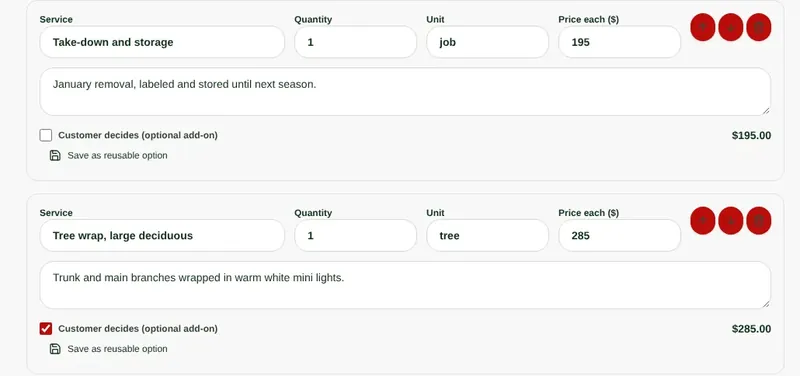
Pick the services, enter the measurements, and your saved prices do the math. Anything the customer should decide on gets marked optional.
- 2
Send a proposal that sells
Your customer gets a branded proposal with a photo of their home, a clear price and the details spelled out. It reads like it came from a big company.

- 3
Let them add the upgrades
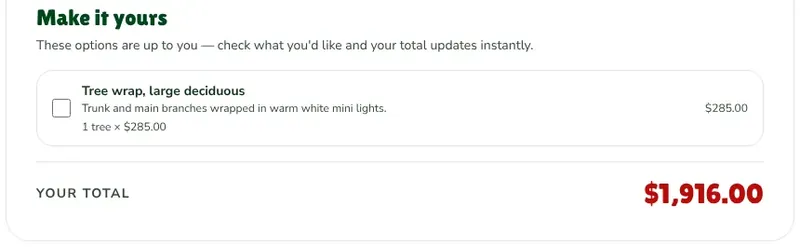
Optional items sit unchecked. One tap adds them, and the total updates on the spot. No back-and-forth, no new quote.
- 4
Get it signed from their phone
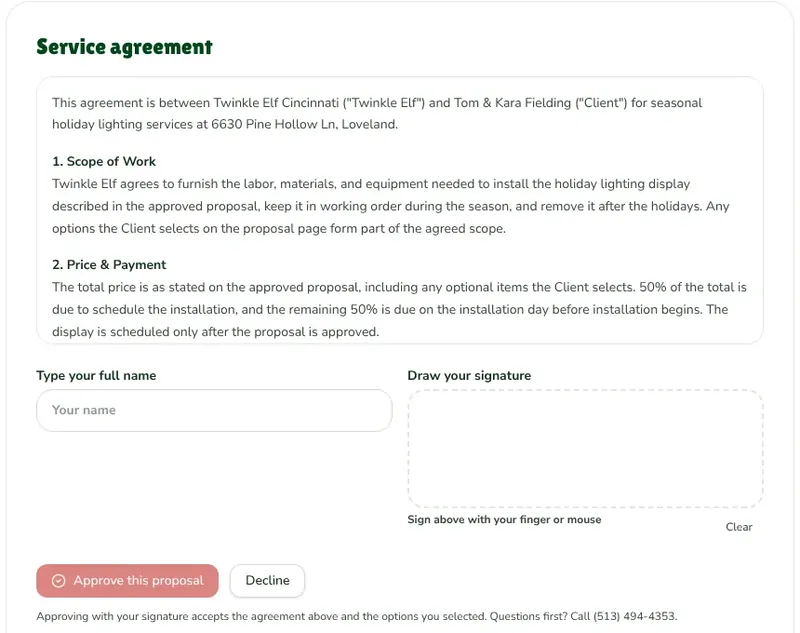
The service agreement fills in their name and address. They sign with a finger, approve, and you get the alert.
- 5
Track every dollar
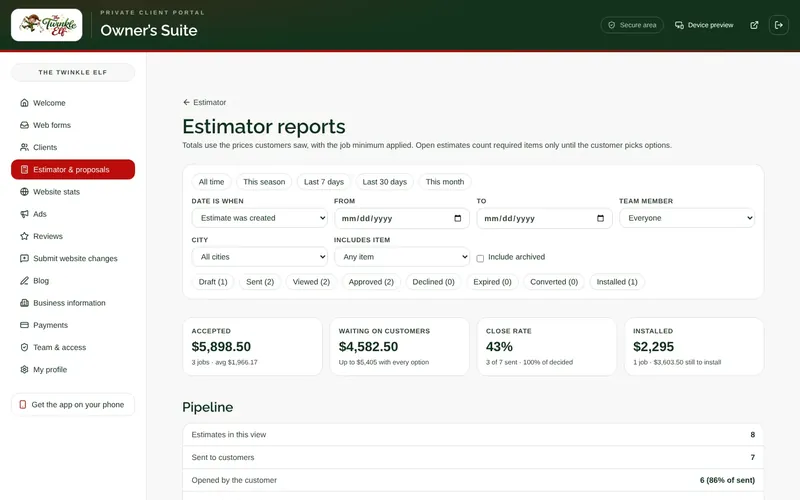
See what's been sent, opened and approved, how much is waiting on customers and your close rate, by team member and by season.
Margins are only as good as the pricing
The trades behind our brands carry strong margins. Those margins show up only when every job is priced consistently and every upgrade gets offered. That's the Estimator's whole job.
See trade profit margins
Estimator questions
Do I have to build my own price list?
No. We load your pricing into the Estimator during launch, from your price sheet or your settings. You can adjust it any time.
Does the Estimator connect to a CRM?
Yes. Leads and customers stay in sync with the CRM behind your Owner's Suite, so you're not typing the same details twice.
Can my salespeople use it?
Yes. Give team members access in the Owner's Suite and they can build and send estimates under your brand.
Get the Estimator with your brand.
One setup fee, three monthly plans, and a brand that's already working. Filling out the form is a conversation, not a commitment.